VVJL Withdrawal - Detailed Guide via GCash in Just a Few Minutes
You just won a bet & want to withdraw money immediately? At VVJL, payment via GCash, PayMaya, or Bank Transfer is fast, safe, and free. This article guides newbies step-by-step on VVJL Withdrawal with important notes to ensure money arrives in your account in just a few minutes. Let’s find out!
Step-by-Step VVJL Withdrawal Guide for Newbies
If this is your first time performing a VVJL Withdrawal, please follow the detailed instructions below to ensure the process is quick, safe, and smooth. Whether you use the website or the application, the steps are similar.
Step 1: Login to VVJL Account
Access the official website or open the VVJL application. Then, log in with your Username/Mobile Number & password.
Note: Only log in via the official website or app of VVJL. Do not click on links shared via social media, strange emails, or unverified chat groups. This helps protect your account and balance from phishing risks.
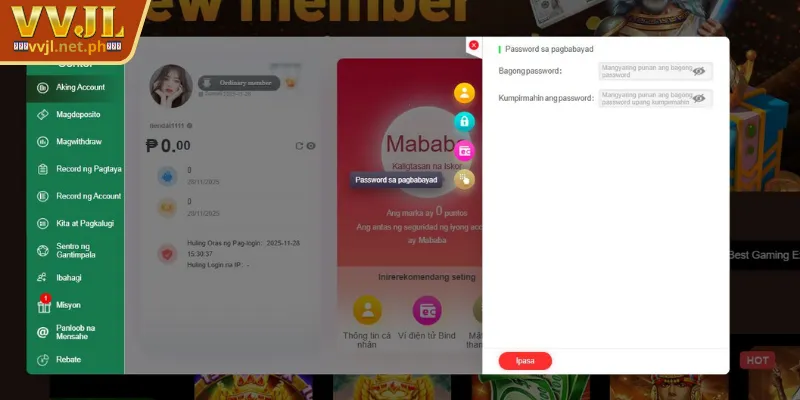
Step 2: Create VVJL Transaction Password
Before performing the first VVJL withdrawal order, the system will ask you to create a Transaction Password to enhance security. At the interface displaying “Set Transaction Password”, enter a password consisting of 6 digits. Re-enter the same password to confirm and then press “Confirm” to complete the setup.
Important Note:
-
The transaction password is a separate security layer helping to protect your funds.
-
Do not share this password with anyone, including those claiming to be VVJL support staff.
-
Every time you withdraw money later, you will be asked to re-enter this password to verify the transaction.
If you forget your VVJL Withdrawal password, go to “Forgot Password” in the account settings section to reset it after identity verification (SMS OTP).
Step 3: Bind Withdrawal Account (Add GCash/Bank)
For the platform to transfer money, you need to bind a valid account. Access the “Withdrawal” section -> “Bind Account”. Enter your Real Name, exactly 100% matching the name registered earlier.
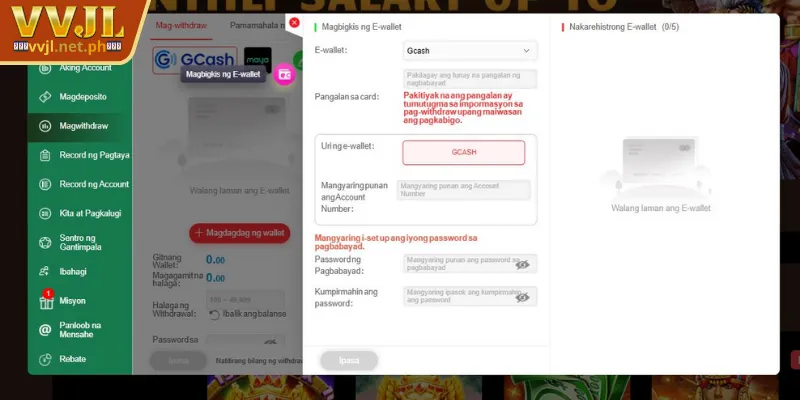
Select the type of account you want to use:
-
E-Wallet: GCash, PayMaya (Enter 11-digit Mobile Number).
-
Bank Transfer: BDO, BPI, Metrobank, UnionBank… (Enter Account Number).
Then, check the information accurately and press “Confirm” to save.
Note:
-
The system only accepts accounts matching the Real Name on the VVJL profile.
-
If you enter the wrong number or use a mismatched account, the transaction will be rejected or returned.
Step 4: Go to “Withdrawal” Section
After creating the transaction password and adding the account, you can start withdrawing. From the main interface, select “Member Center” -> “Withdrawal”. Check the “Available Balance” to know how much you can withdraw, then select the method (e.g., GCash).
Step 5: Enter Amount to Withdraw
Enter the amount you want to withdraw into the corresponding box.
-
Minimum: ₱100
-
Maximum: Depends on account limit or VIP level.
Next, check the following factors carefully:
-
Available Balance: Only includes real money or cleared bonuses (completed turnover).
-
Withdrawal Limit: VVJL applies specific limits for each account.
When you are sure, press “Confirm” to send the withdrawal request. If you withdraw frequently, Download VVJL App to manage transactions faster & receive automatic notifications when money is processed.
Step 6: Confirm & Wait for Processing
After you send the withdrawal order, the system will automatically check account information and the withdrawal amount. If everything is valid, the transaction will be processed immediately.
Average Processing Time:
-
Instant (1-5 minutes): For GCash/PayMaya withdrawals when the account is fully KYC verified.
-
15-30 minutes: For Bank Transfers (depending on banking hours).
When the money is transferred successfully, you will receive a notification via the app. If you have not received it after 24 hours, please contact Customer Service for inspection.
Conditions & Notes When Withdrawing at VVJL
Before executing a VVJL Withdrawal order, players need to understand the rules and conditions to ensure transactions are processed quickly, avoiding errors or unwanted delays. Below are 7 important notes you should remember when transacting:
-
Identity Verification (KYC): For the first withdrawal or large amounts, the platform may ask players to upload ID images to verify identity, ensuring compliance with anti-money laundering regulations.
-
Matching Information: The Real Name in the VVJL account must match the GCash/Bank Account Name completely. The system will reject any withdrawal transactions to accounts with different names.
-
Turnover (Rollover): If players use bonuses/promotions, they need to complete the Wagering Requirement according to regulations before withdrawing.
-
Transaction Limits: The system has minimum & maximum limit regulations for each withdrawal. New players may be limited lower in the beginning.
-
Save Receipt: In case the transaction fails, save the receipt or screenshot to send to the CS department.
-
Do Not Spam Requests: If a withdrawal order is pending, avoid sending new requests – this helps the system process faster & more accurately.
Conclusion
Hopefully, this VVJL Withdrawal guide via GCash will help you receive money quickly and safely. Perform the steps correctly, comply with security notes and withdrawal limits to trade successfully. Enjoy your winnings!